|
2010-06-29, by Kristina
2010-05-28, by Darius
Version 2.7.0 updatesNew Features- Range breaks - use RangeBreak in axis when you want to show values that differ in orders of magnitude like units and thousands - RangeBreak will detect and skip the Y axis portion where no data values are present so that your unit values are still readable.
Axis range break.
- Axis labels can be grouped - useful when adding categories to your data values.
 Axis label groups
- Rotated pie labels. When outside labels for pie are not possible, even though I recommend them as they are the most informative, you can use inside labels option. Rotated labels provide the best fit inside pie segments. Use pie charts with caution - they are not the best way to visualize more than 10 values.
 Rotated Pie labels
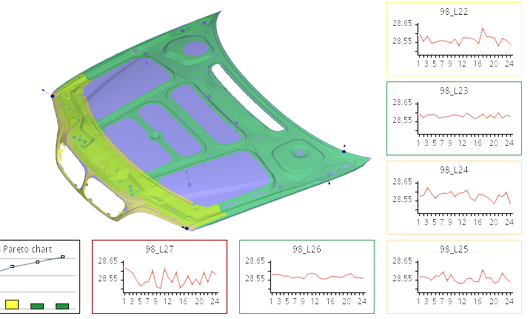
- SPC line plot chart. This is a Statistical Process Control specific chart, which is a part of our MonarchCharts SPC extension for manufacturing quality control.
SPC Line Plot As usual - samples and documentation were updated to reflect recent changes.
2010-04-03, by Darius
Version 2.6.0 updates- Zoom/Scroll bar control - now you can use MonarchCharts scroll bar for zooming in and out.
Scroll/Zoom control for 2D charts.- Anti-aliased 3D charts - anti-aliasing produces great results when used with small charts.

Anti-aliasing on and off.
- Mixed 2D and 3D charts in the same ViewGrid - now making impressive charts is easier then ever!
2D and 3D chart combinations.- New samples with full source code in ChartsDemo, illustrating the features above.
2010-03-09, by Kristina
New Features for 3D PIE series- Auto labels layouter.The labels will be positioned automatic:
Outside: if labels text too large for slice Inside: if labels text fit to slice. pie.setLabelLayouter(Pie3DLabelsLayouters.LABELS_AUTO);- Alternative color for labels font.
Added additional style tag for label font (ALTERNATIVE_COLOR). The initial color will be used then pie labels are inside, alternative color then outside.
Auto positioned labels and alternative color for Pie 3D labels.
2010-03-04, by Kristina
Support request initiated release
Label layouter fix Problem was : The Labels connection
lines were rendered incorrectly: the line ended at the top of label rectangle. It was a problem, when label rectangle was not rendered. After solving problem: The labels connection lines are drawn at the bottom of label rectangle.
2010-01-21, by Kristina
Labels position settings fix for 2D BarSeries.The labels can be positioned : - inside the bar;
- outside the bar;
Label position on BarSeries Label position outside BarSeries
2010-01-08, by Kristina
New Radar - Polar series for 2D releasedA Radar chart is a graphical method of displaying multivariate data in
the form of 2D chart of three or more quantitative
variables represented on axes starting from the same point. A Polar Chart is a circular graph on which data is displayed in terms of values and angles (radians).
Polar series Radar series
2009-12-31, by Kristina
New updates : - label marker alignment.
- cylinder shape for 3D Bar Series.
 Cylinder 3D Bars Label markers alignments example
2009-12-11, by Kristina
New Feature for 2D charts style editing - ToolbarControl. The ToolbarControl allows you to easily change chart appearance directly in your application, without coding: - change text font style, font size,color;
- change chart elements foreground and background colors;
- save changes to stylesheet files;
- load changes from saved stylesheet files;
2009-11-24, by Darius
Support request initiated release Stacked axis fix for BarSeries. Fixed was an issue with stacked BarSeries using horizontal bar orientation.
2009-11-23, by Darius
Minor fixes prior to major version release Fixed AxisAutoAdjuster issue. Fixed java.util.Date to java.sql.Date class cast issue.
2009-10-26, by Kristina
New Surface series for 3D released.This type of chart shows trends in values across two dimensions in a continuous curve. The Surface3D series: - Can be filled with an automatic or user defined color palette. The colors in this chart represent specific ranges of values.
- Can set wireframe style ;
- The Markers are available on Surface 3D series;
- The walls of the chart can be formatted;
The Null value in surface can be drawn : - leaving empty holes in the charts;
- using interpolation of null values;
- using minimum possible value of the scale;
Surface3D with solid wall Surface 3D with null value - empty holes
Surface 3D with null value - filled holes
Surface3D - wireframe style used
2009-10-02, by Kristina
2009-09-16, by Kristina
The MonarchGraph tested with 1.5 and 1.6 Java.
2009-09-04, by Greta
New Feature for Drawing 2D Splines From now on, some segments of a 2D spline function can have null values. Those null-segments can drawn in several ways: - can be not drawn at all leaving an empty gaps in the chart,
- drawn using the different style compared to regular segments of the spline, or
- drawn using the same style for all the segments of the spline.
In case the null-segments are drawn, the spline smoothly interpolates between the boundary know values of the spline.
2009-08-28, by Kristina
MonarchCharts SPC (Statistical Process Control ) extension (see it here)
Extending MonarchCharts is easier then ever. After receiving
numerous requests from our customers, we have released the
MonarchCharts extension for Statistical Process Control (SPC).
SPC extension features
np, p, c, u, XbarS, XbarR, Individual Moving Range, Pareto, Historgram, Scatter, Box & Whiskers charts.
Extension is available FREE of charge to all current MonarchCharts customers with active support accounts.
2009-07-16, by Darius Peckys
2009-06-10, by Vytautas Jakutis
We are glad to announce you that today a new version
of our website was released. New look, convenient gallery browser, new
content, and some new examples. |